Staff, shifts and attendance in one place.

We built HRSystem for shops and retail locations. Staff scan a QR code when they arrive and leave, managers plan the week in a few taps, and leave and requests are approved from the phone. At the end of the month the report is ready.

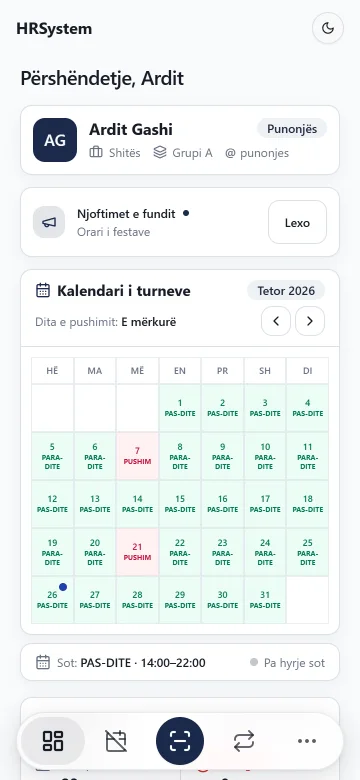
HRSystem on a phone
Price
€999+ for installation and setup
Where it runs
on your own server (preferred) or online
Languages
Albanian, English, Serbian
Version
1.0.6, October 2026

New in version 1.0.6.

The biggest changes of the latest version. We added them because the shops that use it every day asked for them.

New

Shift plan

The whole team’s week in one table. Move a person to the other shift, copy last week and save. When a day is left without anyone, the system warns you, but the decision stays yours.

Try it here: click a cell to change the shift.

Week 44
MonTueWedThuFriSatSun AKArta KrasniqiBHBlend HoxhaDBDrita BerishaEGEndrit GashiFMFjolla MorinaGSGent Shala 23322332233233
Morning 07–15Afternoon 15–22Day off

The plan looks good: every day has people on both shifts.

New

Stores overview

The owner sees every store on one page: late arrivals, absences and overtime of the month, compared with the month before.

StoreLateAbsentOvertime h
Centre12−34+138−6
Arena7−52±021+4
New Town15+26−244+9

This month compared with last month. Example data.

New

You set the limits

In Settings the owner sets the company’s rules. The system applies them to everyone, so nobody has to remember them.

Annual leave days per year
20
Days per request
10
Months of work before first leave
6
On leave at once, per group and role
1
Unpaid leave days
90
Shift swaps per month
3
Late arrival tolerance
5 min

Also new

  • Three languages

    Albanian, English and Serbian. Everyone picks their own language on their phone.

  • Rules with “Accept”

    When the company rules change, everyone reads and accepts them. You see who has.

  • “Got it” on announcements

    For announcements that pop up, you see who has confirmed them.

  • Change history

    Every change in the system: who made it, when and what it was before.

  • Late tolerance

    How many minutes late are not counted, or no tolerance at all.

  • Clearer swaps

    The swap form shows your shift and your colleague’s for that day.

  • A guide for every role

    In the profile, “How to use” explains what each role does, step by step.

  • More security

    Sign out of every device in one tap. Wrong sign-in attempts are limited.

What the system looks like.

Screens from version 1.0.6, with an invented company. Click a screen to see it larger.

What HRSystem does.

The things managers used to keep in a notebook, a spreadsheet or a group chat are now in one place, with the same rules for everyone.

Time

  • QR check-in and out

    Staff scan the store’s code with their phone. Arrival, break and departure get the server’s time.

  • Attendance

    Absences, late arrivals, early departures and overtime of the month, per employee.

  • PDF reports

    The hours report for one employee or the whole team, ready to print.

Shifts

  • Shift planNew

    The team’s week in one table: move, copy last week, save.

  • Rotation

    Morning and afternoon swap every week by themselves, per group.

  • Swaps

    An employee asks a colleague to swap, the manager approves.

  • Holidays

    Public holidays, including repeating ones, show in the calendar and the report.

Leave and requests

  • Leave

    Annual or unpaid, on a calendar. Pending requests show in yellow.

  • Requests

    Group or day-off change, a signed resignation letter. The card shows what it was and what it becomes.

  • LimitsNew

    Leave days, how many at once, swaps per month: set by the owner.

Staff

  • Announcements

    For everyone, for a role or for one person, with “Got it”.

  • Warnings

    Written, with the date issued. Employees see only their own.

  • Cash reconciliation

    Till surplus and shortage for every cashier.

  • Devices

    Tills, phones and terminals, with their damages and repairs.

The owner

  • Stores overviewNew

    Every store in one month, compared with the month before.

  • Manager permissions

    What each manager can see, add, change and delete, page by page.

  • Change historyNew

    Every change: who, when and what it was before.

  • Several stores

    Each store has its own staff; groups, schedules and rules are shared.

The system checks the rules.

Managers don’t have to remember every rule. When something isn’t allowed, the system says so right away.

  • Shifts rotate by themselves

    Morning and afternoon swap every week, even across the new year. When a manager changes the plan, the plan wins.

  • Leave without clashes

    No more people of one group and role on leave at once than your limit allows.

  • QR checked on the server

    The time comes from the server, not the phone. A photo of the code is not enough.

  • Holidays in the reports

    Public holidays show up in the calendar and the hours report by themselves.

  • Unpaid leave in the records

    Once approved, the working days are marked as an “Unpaid” absence.

  • Limits on swaps

    One swap a day per person, and per month as many as the owner allows.

Everyone sees what’s theirs.

There are four roles. The owner also sets each manager’s permissions one by one.

What they doOwnerManagerCashierEmployee
Checks in and out with QR–YesYesYes
Sees their own schedule and records–YesYesYes
Asks for leave, a swap or a change–YesYesYes
Sees their own till reconciliation––Yes–
Approves leave and requestsYesif allowed––
Plans the shiftsYesif allowed––
Sends announcementsYesif allowed––
Sees every storeYes–––
Sets limits and permissionsYes–––
Sees the change historyYes–––

“if allowed” means: only when the owner gives the manager that permission.

Try it yourself, no sign-up.

The demo is the same program our clients use, with an invented company. Pick a role and click around. Your changes stay in your browser only.

  • As an employee: scan the QR code and send a leave request.
  • As the owner: find the request under Leave and approve it.
  • The DEMO button in the corner brings you back here.
Try the demoThe data is made up.
HRSystem on a phone

From the demo to day one.

The system runs on your company’s own computer or server (preferred) or online on hosting. For Windows we have an installer that sets everything up.

  1. 1Demo and quote

    We show you the system and make a quote based on your stores and staff.

  2. 2Installation

    On your own server (preferred) or online on hosting. The installer sets up Node.js, MySQL and HRSystem.

  3. 3Setup

    We enter your stores, groups, positions, schedules, holidays, limits, rules and staff.

  4. 4Support

    Updates and help. As a client you get a portal with your version, invoices and messages to us.

Local Preferred

The database stays with you. The local panel backs up every night, takes a new version in one click and goes back to the old one by itself if something fails. Alerts reach your phone.

Online

Open it from anywhere with internet, no server at your company.

Questions we hear often.

Can’t find your answer? Write to us using the form below or give us a call.

Ask a question
How much does it cost?

Installation and setup: €999+. The exact price depends on how many stores you have, where it runs and whether you want maintenance.

Can we run it on our own server?

Yes, and we recommend it: the database stays with you. It also runs online. For Windows we have an installer that sets up Node.js, MySQL and the system, and a panel for backups and updates.

How does QR check-in work?

A QR code is placed in the store. Staff scan it with their phone when they arrive, start a break, come back and leave. The time comes from the server.

Do we need an app from the store?

No. It opens in the browser on any phone or computer and can be added to the phone’s home screen like an app.

Which languages does it speak?

Albanian, English and Serbian. Everyone picks their own language; names and announcements stay as they were written.

What if the internet is weak?

It opens from the phone’s memory and resends requests by itself when the connection is back. We tested it on mobile data.

Can we have several stores?

Yes. Each store has its own staff, records and reconciliation, and the owner compares them in the Stores overview. Groups, schedules, holidays and rules are shared.

Who can see the data?

Employees see only their own, managers their store within their permissions, the owner everything. Passwords are stored encrypted and every change is written to the history.

Tell us about your business.

How many stores and how many employees? We’ll get back to you with a demo and a quote. You can decide on hosting later.

Price
€999+ for installation and setup
Where it runs
on your own server (preferred) or online

Want to follow your request yourself? Create a client account

Request a demo or a quoteWe usually reply the same day.
Where would you like it?
0 / 1500
Your request comes straight to us.
RH HRSYSTEM